
AI Video Editor - Vidma Cut AI
Vidma Video StudioVideo Players & Editors
4.62.88K Reviews
- Version
- 2.29.0
- Installs
- 50.00M
- Age Rating
- Everyone
Screenshots
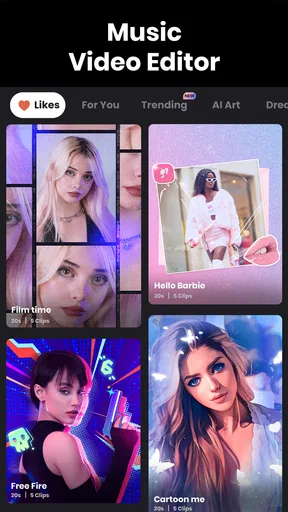
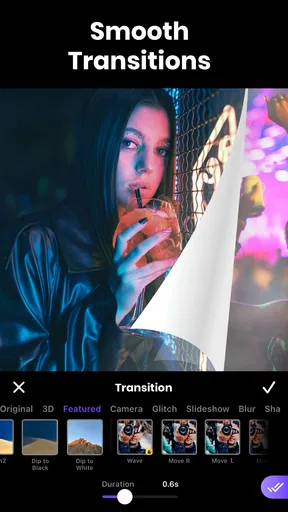

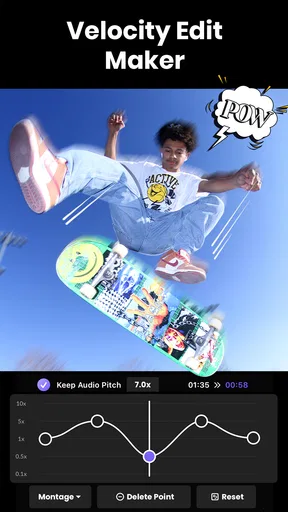
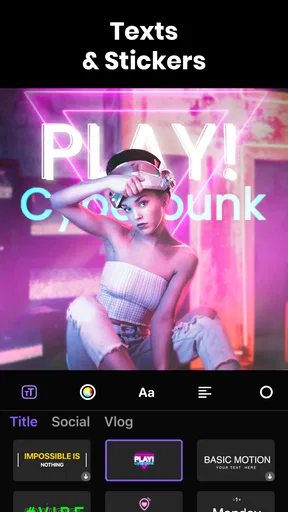
Our Review of AI Video Editor - Vidma Cut AI
 Analysis by Appyee
I tend to judge a mobile editor by a practical question: can I turn a handful of clips into something worth sharing without losing my evening to menus and tiny adjustments? That is the appeal of Vidma Cut AI. It is a video-editing app from Vidma Video Studio, aimed at making creative work feel approachable, especially when I want a quick result rather than a lesson in professional editing. Its AI-focused approach can help get a project moving, though it is still worth treating the automated choices as a starting point rather than a substitute for your own judgement.
A quick project starts with a clear goal
Before opening any editor, I find it helps to decide what the finished video is for: a short social post, a recap for friends, or a more deliberate piece with a particular mood. That choice matters here because effects and music can easily become the main event. I would begin by picking the moments that tell the story, then use the app’s editing tools to shape them, rather than selecting every clip and hoping automation will find the point for me.
That approach is especially useful for everyday footage. Imagine filming a meal with friends: a few seconds of the table, a quick reaction, and a shot of the finished dish. A short edit can keep the moment lively without asking viewers to sit through every pause. For a family recap or a small-business post, the same principle applies: decide what the viewer should remember, then let the edit support that idea.
Where AI helps—and where I would take over
Automation is most valuable when it removes repetitive work, not when it makes creative decisions unquestionable. A suggested cut, effect, or subtitle can save time, but I would still check whether the selected moment makes sense in context. A technically neat trim can remove a reaction that gives a clip its warmth, while a dramatic filter may distract from an otherwise natural scene. My rule is simple: use AI to make a first pass, then review the result with the sound on and the sound off.
Subtitles deserve their own careful check. They can make spoken video easier to follow in quiet places or when someone is watching without audio, but names, slang, and overlapping voices are exactly where automatic text can stumble. I would scan the captions before publishing, paying attention to the first few seconds as well as any line that contains a name or important detail. That small review is often more useful than applying another visual effect.
Choosing it over a more manual editor
Compared with a conventional timeline-focused editor, Vidma Cut AI’s appeal is convenience: it is for people who would rather assemble a presentable clip than adjust every edit point by hand. That can be a good fit for casual creators who publish short videos, make travel or event recaps, or want a quick visual idea to share. A more manual editor is the better choice when exact timing, layered audio, detailed color work, or a carefully controlled sequence matters more than speed.
I would also think about the destination before choosing a workflow. A quick personal montage can tolerate a playful preset; a product demonstration or an instructional video usually benefits from restrained effects and readable text. Keeping a clean version of the edit in mind helps: if a filter or transition is doing more than the footage itself, dial it back. This is a practical way to keep an AI-assisted result from feeling overprocessed.
Making revisions without losing the point
My most useful editing habit is to make changes in passes. First, get the story into a sensible order. Next, trim pauses and check the pacing. Only then consider music, subtitles, or a visual treatment. This makes it easier to tell whether an effect actually improves the video, because the underlying sequence already works. It also avoids the common trap of polishing a weak opening while the rest of the clip still feels unfocused.
For a recurring format—say, a weekly activity recap—I would keep the same basic rhythm from one video to the next but still review each clip on its own merits. A repeated style can make a series feel coherent; copying every choice automatically can make it feel stale. In Vidma Cut AI, the useful balance is to let the app speed up routine decisions while reserving the final say on what stays, what gets cut, and how the finished piece should feel.
Before sharing the finished video
Export is not just a final button press; it is the last quality check. I would watch the finished video from beginning to end and look for abrupt cuts, captions that appear too briefly to read, music that competes with speech, or an ending that stops mid-thought. If the clip is meant for a particular platform, check its current posting requirements separately rather than assuming one edit will suit every destination. A quick preview on the phone also helps reveal whether small text and subtle details remain easy to see.
People often wonder whether an AI editor means they can skip editing experience altogether. I would not put it that way. Vidma Cut AI can lower the barrier to getting started, but a clear idea and a final human review still make a noticeable difference. If you need precise, repeatable control over a complex project, a dedicated desktop or manual mobile editor may suit you better. If your aim is a concise, shareable video without building every cut from scratch, this kind of workflow is much more appealing.
If you’re like me, the thought of editing videos can feel a bit daunting. But, enter AI Video Editor - Vidma Cut AI, and suddenly, things get a whole lot simpler. This app has been making waves in the editing world, promising to turn anyone into a video editing pro without needing a film degree. So, I dove in to see if it lives up to the hype.
Getting Started with Vidma Cut AI
First off, downloading and setting up the AI Video Editor - Vidma Cut AI app is a breeze. Available on both Android and iOS, it’s a quick and easy install. Once you open it up, you’re greeted with a sleek and intuitive interface. It’s clear that the developers have prioritized user experience. Everything is laid out so intuitively that you can start working on your first project right away.
Features That Make a Difference
What sets Vidma Cut AI apart from other video editing apps is its AI-driven features. The app cleverly uses artificial intelligence to simplify the editing process, which means less manual tweaking and more automatic magic. Let’s break down some of the standout features:
- Smart Cut: This feature automatically trims unnecessary parts of your video, identifying and highlighting the best moments. It's perfect for someone who needs to get a project done quickly without sacrificing quality.
- AI Effects and Filters: With a rich library of effects and filters, the AI suggests enhancements that align with the mood and style of your video. It’s like having a creative partner who knows just what you’re looking for.
- Auto Subtitle Generation: This is a game-changer for content creators. The app automatically generates subtitles, saving you the hassle of typing them out manually. Plus, it’s impressively accurate!
User Experience
Using Vidma Cut AI is like having a creative toolbox at your fingertips. The interface is user-friendly, and the AI features make the editing process feel less like a chore and more like an adventure. I was particularly impressed with how the app handled transitions and audio syncing, two areas where many apps fall short.
Plus, the app doesn't bombard you with ads, which is a huge win in my book. You can focus on your creative process without constant interruptions.
Performance and Reliability
Performance-wise, Vidma Cut AI is pretty solid. It runs smoothly on both Android and iOS devices, and I didn’t experience any crashes or glitches during my time with it. The app handles high-resolution videos well, which is crucial for anyone serious about video editing.
One thing to note, however, is that some of the more advanced features require a stable internet connection since they rely on cloud processing. But honestly, this is a small trade-off for the convenience and power that the AI features bring to the table.
Is Vidma Cut AI Worth It?
In a word, yes. Whether you’re a seasoned content creator or just someone who enjoys making videos for fun, AI Video Editor - Vidma Cut AI offers a wealth of features that are both powerful and easy to use. Its AI capabilities streamline the editing process, making it accessible to everyone, regardless of skill level.
Sure, there are other video editing apps out there, but few can match the balance of simplicity and sophistication that Vidma Cut AI offers. It’s a fantastic tool that makes video editing less about the grind and more about the creativity.
So, if you’re in the market for a video editor that does a lot of the heavy lifting for you, give AI Video Editor - Vidma Cut AI a try. You might just find it’s the editing companion you’ve been searching for.
Who will get the most from it
The strongest match is someone who makes short, occasional videos and wants help moving from raw footage to a shareable edit. If you post casual clips, make a birthday recap, or want captions without typing each line from scratch, the combination of automatic assistance and familiar editing tools is appealing. It is also a sensible starting point for a new creator who wants to learn by adjusting a suggested result instead of facing a blank timeline.
There is a different calculation for people who edit professionally or need strict consistency across many deliverables. Automated selections can be convenient, but they may not follow a client’s exact brief, preserve every important take, or maintain a precise visual style. I would not rely on a suggested edit without checking each cut, especially when a missed detail could change the meaning of a demonstration or interview.
Practical choices that save time
One useful habit is to record with the edit in mind. Capture a clear opening shot, leave a little breathing room before and after important actions, and avoid filming several nearly identical takes unless you expect to compare them. This gives Smart Cut better material to work with and makes it easier to spot the strongest moment. Automation can help organize a story, but it cannot make a shaky or unclear shot communicate something it never captured.
For a video with speech, decide early whether the voice or the music should lead. If the words carry the message, keep the soundtrack secondary and read every generated subtitle as if you were the viewer seeing it for the first time. If the clip is mostly visual, music can provide momentum, but a beat-driven edit should still leave enough time for each shot to register. These checks are more valuable than adding layers simply because they are available.
Another trade-off is connectivity. The app’s more advanced AI processing may depend on a stable internet connection, so I would avoid leaving a cloud-assisted step until the last minute when travelling or working somewhere with unreliable service. Build in time to review the result afterward. That way, a slow connection does not become a rushed decision about whether the video is ready to share.
Cost, fit, and expectations
The app is free to install, with in-app purchases ranging from about fifty cents to around ninety dollars per item. I would start with the free experience and only consider a purchase after identifying a specific tool or workflow I genuinely need; a long list of editing options is not automatically a reason to pay. Its average rating is 4.6 from roughly 378,000 ratings, and it has passed 50 million installs, which indicates broad uptake but cannot tell you whether its particular style suits your projects.
Vidma Cut AI is rated for Everyone, and the current version is 2.25.2; it requires Android 9 or later. The app is also available on iOS. Those details make it easier to check basic compatibility before planning a project, but the more important question is whether the editing approach fits your habits. If you enjoy shaping every beat yourself, a manual editor will feel more satisfying. If you want help turning ordinary footage into a presentable short video, this is the kind of tool I would try first.
A final creator’s judgement
What I like most about this app’s premise is that it treats editing as a practical activity, not a test of technical skill. AI suggestions can reduce the number of small decisions between filming and sharing, while effects and subtitle tools give beginners a way to experiment. The best results still come from choosing footage carefully and checking the finished piece with a critical eye; convenience works best when it gives you more time to make deliberate choices, not fewer.
For quick personal projects and lightweight social content, Vidma Cut AI is worth considering. For complex edits, exact control, or work where every caption and frame must be dependable, I would choose a more hands-on editor or verify the final output especially carefully. If you go in expecting a helpful assistant rather than an automatic director, you are more likely to find a useful place for it in your creative routine.
Verdict
Strengths of AI Video Editor - Vidma Cut AI
- Intuitive interface for easy navigation.
- Wide range of AI editing tools.
- Supports multiple video formats.
- Quick export with high quality.
- Regular updates with new features.
Limitations of AI Video Editor - Vidma Cut AI
- Limited free version features.
- Occasional lag on older devices.
- Requires internet for full functionality.
- Some features locked behind paywall.
- Ads can be intrusive in free version.
Other Releases by Vidma Video Studio
View All
Screen Recorder - Vidma Record
Video Players & Editors4.5

TextNum: Call + Text for Now!
Communication4.5
Similar Picks in This Category
View All
Google TV
Google LLC3.9

iTunes
Apple4.7

YouTube
Google LLC3.8

MX Player
Amazon Mobile LLC4.2

CapCut - Video Editor
Bytedance Pte. Ltd.3.5

PLAYit-All in One Video Player
PLAYIT TECHNOLOGY PTE. LTD.4.5
Frequently Asked Questions
What features does AI Video Editor - Vidma Cut AI offer?
AI Video Editor - Vidma Cut AI provides a range of features including automated video editing, AI-driven effects, transitions, and music synchronization. It also offers tools for trimming, cutting, and merging clips, along with a library of filters and templates to enhance your videos. The app is designed to simplify the editing process while delivering professional-quality results.
Is AI Video Editor - Vidma Cut AI suitable for beginners?
Yes, AI Video Editor - Vidma Cut AI is highly suitable for beginners. The app's user-friendly interface and AI-driven features make it easy for newcomers to create polished videos without needing advanced editing skills. Tutorials and guides are also available to help users navigate the app effectively and maximize its potential.
Can I use AI Video Editor - Vidma Cut AI on both Android and iOS devices?
Absolutely, AI Video Editor - Vidma Cut AI is available for both Android and iOS platforms. Users can download the app from the Google Play Store or the Apple App Store. The app is optimized for various devices, ensuring a seamless editing experience regardless of the operating system you are using.
Does AI Video Editor - Vidma Cut AI support high-resolution video exports?
Yes, AI Video Editor - Vidma Cut AI supports high-resolution video exports, including up to 4K quality. This feature allows users to maintain excellent video clarity and detail, making it ideal for sharing on platforms that support high-definition content. The export process is straightforward, ensuring ease of use for all users.
Are there any in-app purchases or subscription fees for AI Video Editor - Vidma Cut AI?
AI Video Editor - Vidma Cut AI offers both free and premium versions. The free version includes basic editing tools and features, while the premium version unlocks additional capabilities such as advanced effects, royalty-free music, and increased export options. Subscription fees for the premium version vary, and users can choose monthly or yearly plans.
